 BJCRUM
Your First Prompt
Learn how to describe your idea in plain language so BJCRUM understands what to build, who it's for, and what users should be able to do.
Every BJCRUM project starts with a prompt.
A prompt is simply a description of what you want BJCRUM to build, change, or help you accomplish.
You don't need to know how to code, write technical specifications, or describe the architecture of your application. Start by explaining your idea in your own words.
Start with what you want to build
A simple prompt can be enough to get started.
For example:
Build a world-class construction website. The website should have all the navigations a construction website should have. Use professional and very clean images.
BJCRUM takes your request and determines how to turn it into a working product.
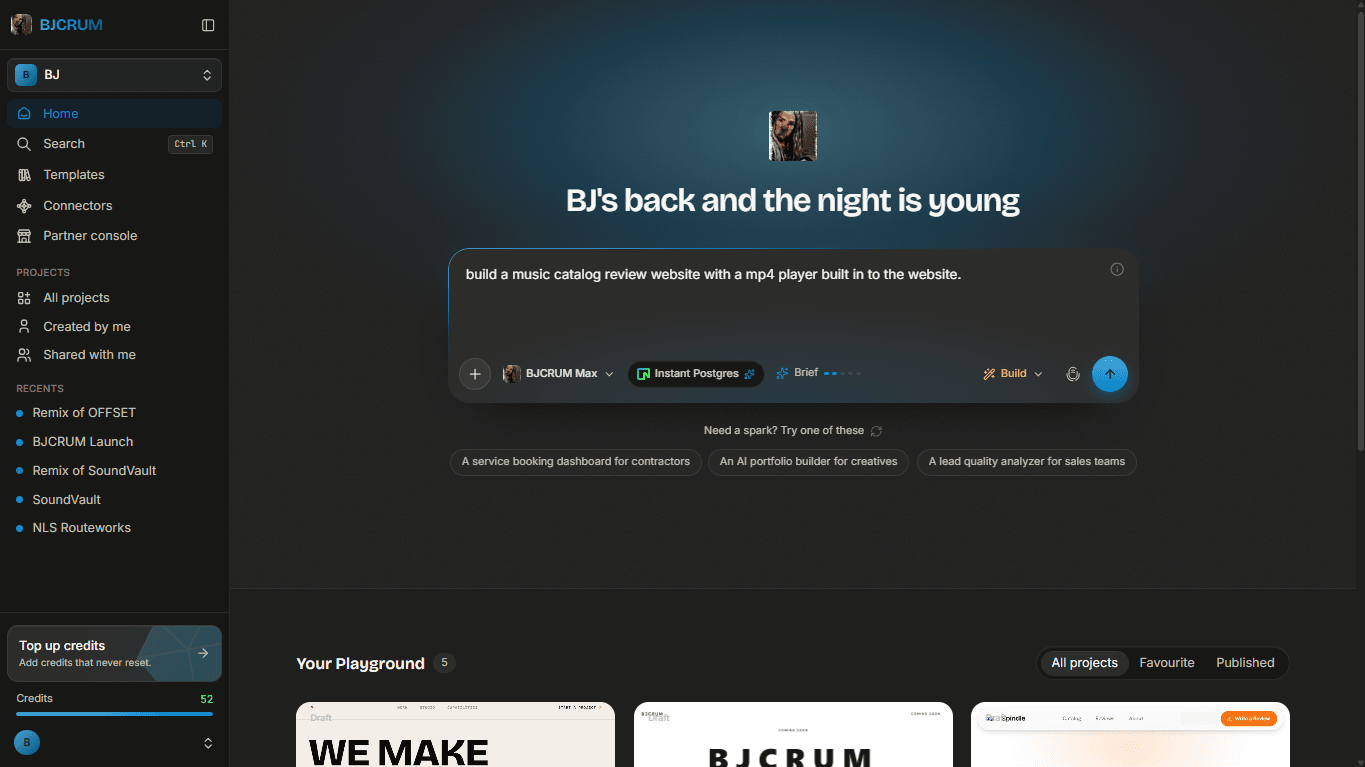
A simple formula for your first prompt
If you're not sure what to write, start with three things:
What you're building + who it's for + what it should do
For example:
Build a CRM for a real estate agency. Agents should be able to manage leads, properties, deals, and customer follow-ups.
Or:
Build a booking website for a beauty salon. Customers should be able to view services, choose a stylist, select an available time, and book an appointment.
Or:
Build a client portal for a digital marketing agency. Clients should be able to log in, view their projects, download reports, and send messages to their account manager.
That's enough information for BJCRUM to understand the direction of the product.
Add more context when you have it
You can give BJCRUM more information when you already know what you want.
Useful details can include:
- The type of product you're building
- Who will use it
- Important pages
- Features you need
- How users should interact with it
- Your preferred design direction
- Examples of products or experiences you like
For example, instead of:
Build a restaurant website.
You could say:
Build a premium Italian restaurant website. Include Home, Menu, About, Reservations, Gallery, and Contact pages. The design should feel elegant and modern with large food photography. Make it fully responsive.
Both prompts can work.
The second simply gives BJCRUM more direction.
You don't need to describe the code
Focus primarily on the product you want, not how you think BJCRUM should implement it.
You usually don't need to start with instructions such as:
Create a React application with PostgreSQL and build five API endpoints...
Instead, you can say:
Build a customer portal where customers can create accounts, log in, submit support requests, and track the status of their requests.
BJCRUM can determine the implementation requirements from the product you're describing.
Talk to BJCRUM like a product team
A useful way to think about prompting BJCRUM is to imagine you're explaining the project to a product team.
Instead of trying to find the perfect AI command, describe:
What are we building? A SaaS application for freelancers.
Who is it for? Freelancers who manage multiple clients.
What problem does it solve? They need one place to manage clients, projects, invoices, and deadlines.
What should users be able to do? Create clients, create projects, assign tasks, track invoices, and see upcoming deadlines from a dashboard.
Put together, your prompt becomes:
Build a SaaS application for freelancers who manage multiple clients. They need one place to manage clients, projects, invoices, and deadlines. Users should be able to create clients, create projects and tasks, track invoices, and see upcoming deadlines from a dashboard. Make the interface clean, modern, and professional.
That's a strong starting prompt.
Don't try to build everything in one prompt
For larger applications, you don't have to describe every future feature before you begin.
Start with the core product.
Then continue working with BJCRUM.
For example:
First prompt
Build a CRM for a real estate agency where agents can manage leads and properties.
After the first build:
Add a deal pipeline where agents can move deals through different sales stages.
Then:
Add follow-up reminders for each lead.
Then:
Create a dashboard showing leads, active deals, upcoming follow-ups, and total pipeline value.
This keeps the development process focused and gives you opportunities to review the product as it evolves.
What happens after you submit your prompt?
Once you submit your prompt, BJCRUM analyzes your request and begins working with you on the product.
Depending on the mode you've selected, BJCRUM can either help structure the plan first or move into building.
You can then review the result and continue the conversation.
Your prompt isn't a one-time instruction.
It's the beginning of your collaboration with BJCRUM.
Your first prompt checklist
Before submitting your first prompt, ask yourself:
- What am I building?
- Who is it for?
- What should users be able to do?
- Are there any important features I already know I need?
- Do I have a preferred design direction?
You don't need an answer to every question.
If BJCRUM understands the product, audience, and main goal, you have enough to start.
Next: Understanding the interface
Now that you know how to start a conversation with BJCRUM, let's take a closer look at the workspace and the tools you'll use while building.